Which File Format Should I Use?
Answer a few real questions and get an accurate, technically-grounded file format recommendation with the real tradeoffs · free, no signup
How Which File Format Should I Use? works, step by step
Choose the media type: image, video, audio or document.
 Download it
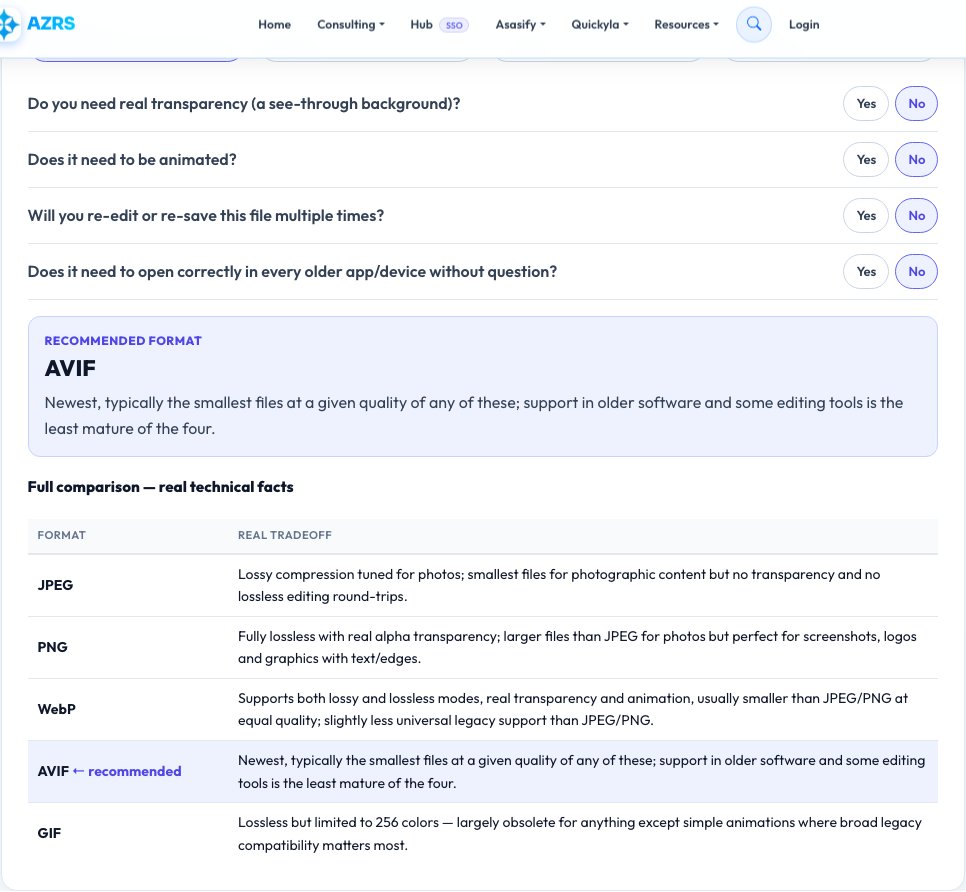
Answer 2-4 real yes/no questions about your actual needs (transparency, editing, compatibility, size).
Which File Format Should I Use?
Picking between JPEG, PNG, WebP and AVIF — or MP4, WebM and MOV — or MP3, FLAC, WAV and AAC — or DOCX, PDF and ODT — actually has real, factual right answers depending on what you need, not just personal preference. This tool asks a short set of real technical questions (do you need transparency? animation? lossless editing? maximum compatibility? smallest file size?) and walks a decision tree built from genuine, accurate technical facts about each format's compression method, quality behavior and real-world compatibility.
Every recommendation comes with the real technical reasoning behind it — for example, why PNG is lossless but WebP can be both lossless and smaller, why FLAC preserves the exact original audio while MP3 permanently discards data, or why a PDF freezes layout while a DOCX stays editable — so you understand the actual tradeoff, not just a bare recommendation.
Key features
Real decision tree, not a fixed list
Your specific answers (transparency, animation, editability, compatibility) change which format is actually recommended.
Covers images, video, audio and documents
One tool spans the four format families people get stuck on most often.
Explains the real technical tradeoff, every time
Every recommendation states the genuine compression/quality/compatibility reasoning, not just a name.
A full comparison table, not just one answer
See how your top recommendation stacks up against the runner-up formats on the facts that matter to you.
How to use it
- Choose the media type: image, video, audio or document.
- Answer 2-4 real yes/no questions about your actual needs (transparency, editing, compatibility, size).
- Get a specific format recommendation with the real technical reason behind it.
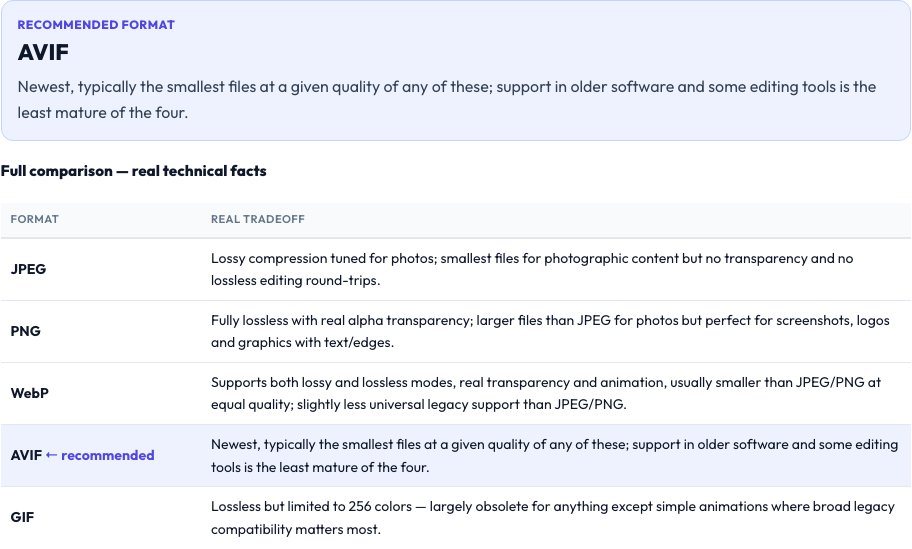
- Check the comparison table to see how the alternatives differ on the same real facts.
Worked example
Example
Image, needs transparency, will be re-edited later, size isn't critical → recommends PNG (lossless, real alpha transparency, universal compatibility) over JPEG (no transparency support at all) and over WebP (transparency support exists but compatibility with older software is weaker).
Who uses this tool
Anyone exporting an image, video or document and unsure which format to pick
Get a real answer grounded in actual technical facts instead of a guess.
Web developers choosing an image format for a site
Understand the genuine compression and browser-support tradeoffs between JPEG, PNG, WebP and AVIF.
Anyone archiving photos, audio or documents long-term
Learn which formats are truly lossless versus which discard data permanently on save.
Tips for the best results
- 'Lossless' means the file can be perfectly reconstructed to the original bit-for-bit; 'lossy' permanently discards some data to shrink the file — this distinction, not file extension familiarity, should usually drive the choice for anything you might need to edit again later.
- Compatibility tradeoffs are real and change over time — a newer, more efficient format (like AVIF or WebP) may not open correctly in older software, which matters if you don't control every device that will open the file.
- For documents specifically, PDF freezes exact layout everywhere it's opened while DOCX/ODT stay editable but can reflow differently between programs — pick based on whether the receiver needs to edit it.
Common mistakes to avoid
- Re-saving a lossy file (like a JPEG) repeatedly during editing, which compounds quality loss each time — always keep and edit from a lossless master if you'll touch the file again.
- Choosing the newest, most efficient format without checking whether the software/device that needs to open it actually supports it yet.
- Assuming file extension alone tells you the compression type — for example, some 'PNG' exports are actually re-compressed from a JPEG source and won't recover detail that was already lost.
Why use AZRS QuickFix?
It is 100% free, needs no signup and has no watermark or usage limits. The tool runs in your browser, so what you type stays on your device, and it works on phones, tablets and desktops. New tools are added every week — bookmark this page or browse the full QuickFix toolbox.
Frequently asked questions
Is WebP really better than JPEG and PNG?
Technically, WebP usually produces a smaller file than JPEG at equivalent visible quality, and unlike JPEG it also supports a lossless mode and real transparency like PNG — its real downside is that some older software and workflows don't fully support it yet, which this tool weighs in the recommendation.
What's the real difference between lossy and lossless?
Lossless formats (PNG, FLAC, WAV) can be perfectly reconstructed to the original data; lossy formats (JPEG, MP3, most video codecs) permanently discard some information to shrink the file size, and that loss compounds if you re-save the file repeatedly.
Why does the tool ask about animation for images?
Because it's a real technical differentiator — GIF and WebP support animation natively, while JPEG and standard PNG do not, so animation need alone can immediately rule out or rule in specific formats.
Does this apply to video and audio too, not just images?
Yes — the same real-fact decision tree covers MP4/WebM/MOV for video and MP3/FLAC/WAV/AAC for audio, and DOCX/PDF/ODT for documents.
Is this AI-generated advice?
No — the format facts (compression type, transparency/animation support, real compatibility considerations) are fixed, accurate technical information built into the tool's decision logic, not generated per request.
Is my data stored?
No — this tool doesn't process any file, it only asks questions and returns a recommendation.