Storage Unit Converter (KB/MB/GB/TB)
Convert bytes, bits, KB, MB, GB, TB and PB, showing both binary (1024-based) and decimal (1000-based) values · free, no signup
How Storage Unit Converter (KB/MB/GB/TB) works, step by step
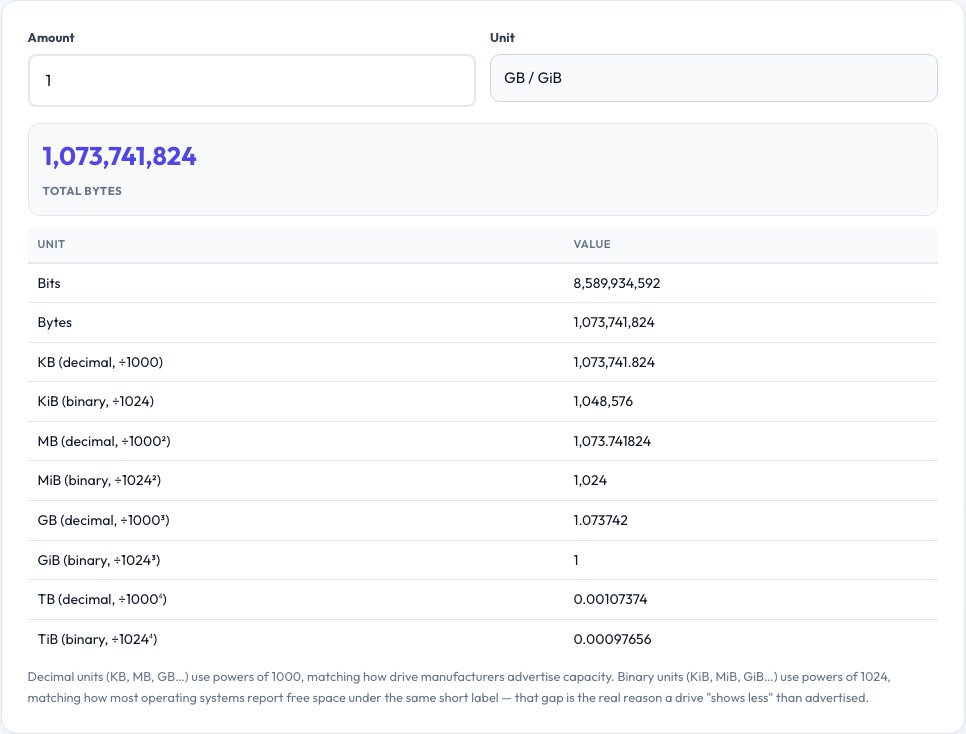
Enter an amount.
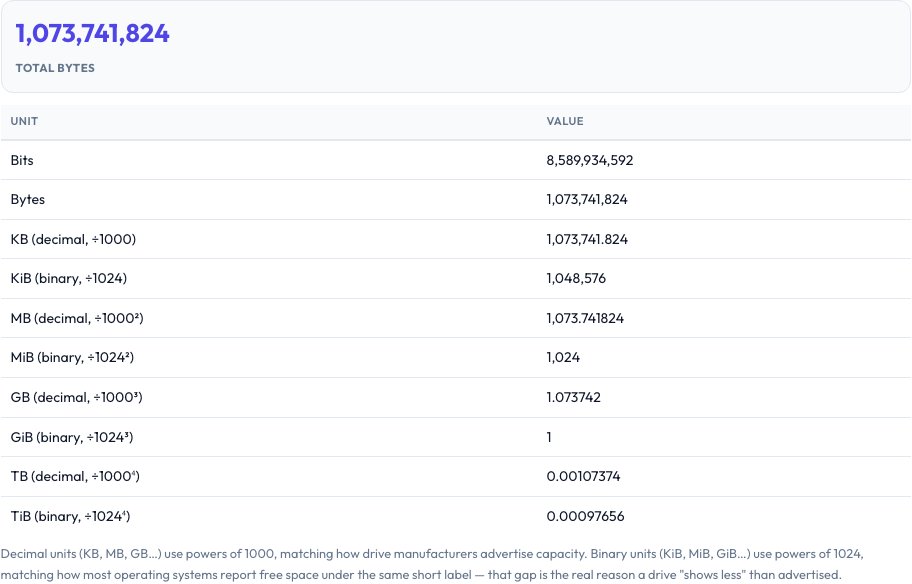 Download it
Choose its unit.
Free Storage Unit Converter — Binary vs Decimal, Side by Side
Enter an amount and a unit, and this tool converts it across bits, bytes, kilobytes, megabytes, gigabytes, terabytes and petabytes — but critically, it shows both the binary interpretation (powers of 1024, technically KiB/MiB/GiB) and the decimal interpretation (powers of 1000, what "KB/MB/GB" technically means in the SI system) side by side, because different tools mean different things by the same label.
This is the real, well-documented reason a drive advertised as "1TB" (1,000,000,000,000 bytes, the decimal meaning manufacturers use) shows up as roughly 931GB in an operating system that reports the binary (1024-based) value under the same "GB" label — nothing is missing, the two systems are just counting differently.
Key features
Both binary and decimal shown
See the 1024-based and 1000-based value for every unit at once, not just one convention.
Full unit range
Bits, bytes, KB/KiB up through PB/PiB.
Explains the drive-size discrepancy
Understand exactly why advertised and displayed storage sizes differ.
Instant, precise conversion
Real exponential math, not rounded approximations.
How to use it
- Enter an amount.
- Choose its unit.
- See it converted into every other unit, in both binary and decimal.
- Use the explanation to understand any size discrepancy you're seeing.
Worked example
Example
A drive labeled 1TB (decimal: 1,000,000,000,000 bytes) shows as about 931.32 GiB (binary: divide by 1024 three times) in an OS that reports binary gigabytes under the "GB" label — the same physical bytes, two different counting conventions.
Who uses this tool
Anyone confused why their new drive "shows less space"
See the real, precise math behind the discrepancy instead of assuming something's wrong.
Developers and IT professionals
Convert file, transfer or storage sizes precisely between units for specs, quotes or documentation.
Students learning about data units
Understand the real difference between the binary and SI/decimal meanings of the same prefix.
Tips for the best results
- Storage manufacturers (hard drives, SSDs, USB drives) almost universally use the decimal (1000-based) definition when advertising capacity.
- Operating systems and file browsers (Windows, macOS, Linux) very commonly report the binary (1024-based) value while still labeling it "KB/MB/GB" instead of the technically correct "KiB/MiB/GiB" — this is the actual root cause of the confusion, not a manufacturing shortfall.
- RAM capacity (like "16GB of memory") is essentially always the binary value, since memory addressing is inherently based on powers of 2.
Common mistakes to avoid
- Assuming a drive that "shows less" than advertised is defective or being sold dishonestly — the discrepancy is almost always this binary-vs-decimal labeling convention, not missing capacity.
- Mixing up bits and bytes — network speeds are usually quoted in bits per second (Mbps), while file sizes are in bytes, an 8x difference that trips up a lot of download-time estimates.
- Assuming every context uses the same convention — always check which one a spec sheet or OS dialog means when precision actually matters.
Why use AZRS QuickFix?
It is 100% free, needs no signup and has no watermark or usage limits. The tool runs in your browser, so what you type stays on your device, and it works on phones, tablets and desktops. New tools are added every week — bookmark this page or browse the full QuickFix toolbox.
Frequently asked questions
Why does my new 1TB drive show less than 1TB of space?
Manufacturers use the decimal definition (1TB = 1,000,000,000,000 bytes) while your operating system typically reports the binary definition under the same "GB" label (1024-based), so the same physical bytes show up as a smaller number — about 931 GiB for a decimal 1TB drive.
What's the difference between KB and KiB?
KB (kilobyte) technically means 1000 bytes in the SI/decimal system; KiB (kibibyte) is the unambiguous binary term for 1024 bytes — in casual and even OS usage, "KB" is very often used to actually mean KiB, which is the source of most confusion.
Is RAM measured in binary or decimal?
Binary — RAM capacity is built from powers of 2 due to how memory addressing works, so "16GB of RAM" means the binary value, unlike most advertised drive capacities.
Are network speeds in bits or bytes?
Almost always bits per second (like 100 Mbps), while file sizes are in bytes — dividing a bit-based speed by 8 gives you the byte-based download rate.
Is my data sent anywhere?
No, this is a pure math conversion done locally in your browser.
Is this free?
Yes, unlimited conversions, no signup.