Fancy Text Generator
Turn plain text into 𝓯𝓪𝓷𝓬𝔂 Unicode styles · free, no signup
See Fancy Text Generator in action
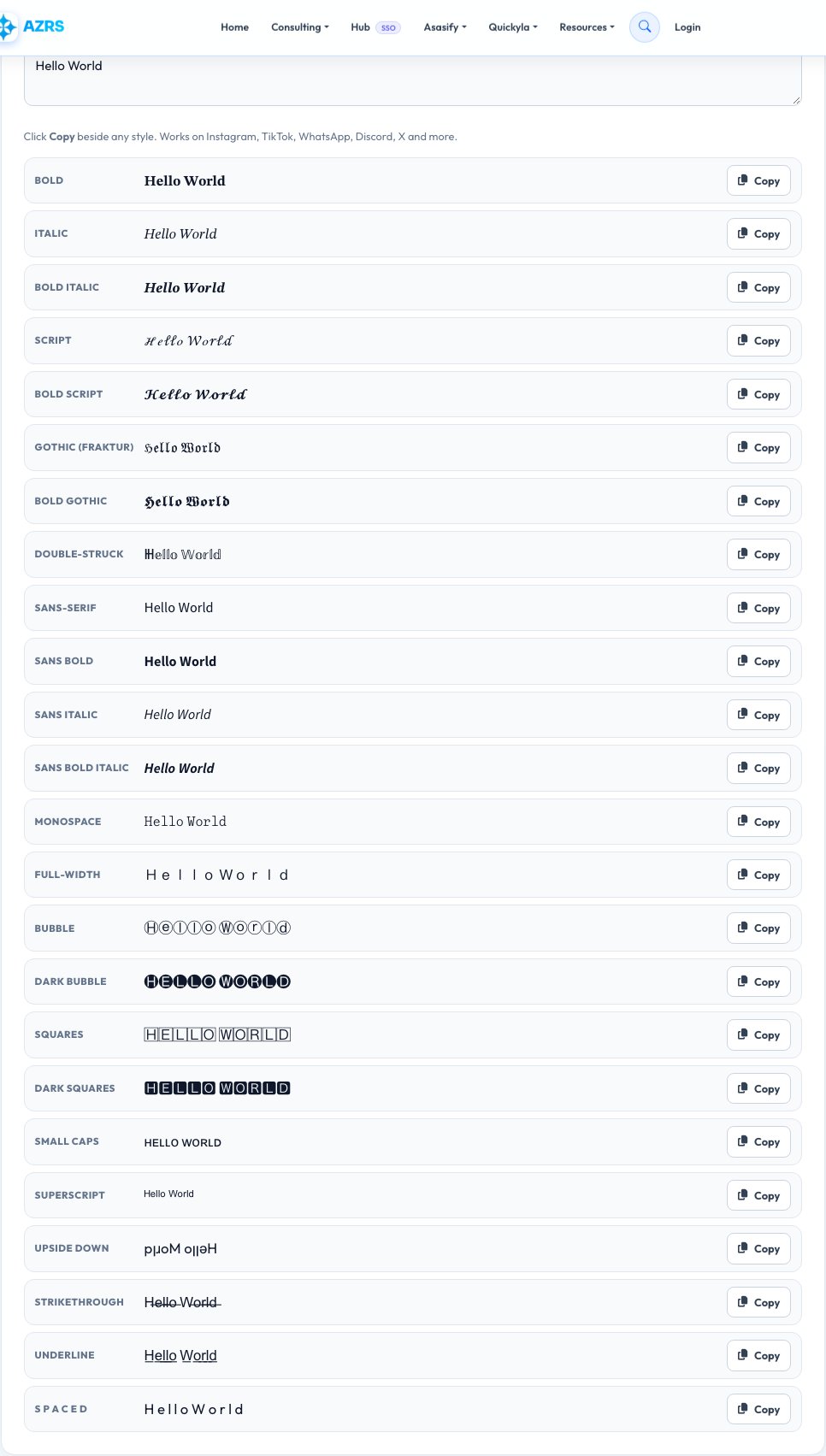
Free Fancy Text Generator — Cool Fonts You Can Copy and Paste
A fancy text generator converts ordinary letters into stylish look-alike characters from the Unicode standard — bold, italic, script, gothic, double-struck, bubble, small caps and more. Because the results are real text characters rather than images or fonts, you can paste them into almost any app: Instagram bios, TikTok and YouTube titles, WhatsApp and Discord messages, X posts, gaming names and profile headlines.
Type once and see more than twenty styles at the same time. Click Copy beside the style you like. Nothing is uploaded, nothing is installed and there is no sign-up. Note that some very old devices show unsupported symbols as boxes, so it is worth previewing a style on the platform you intend to use.
Key features
20+ styles at once
See every style live as you type and pick your favourite.
One-click copy
Copy the result and paste it straight into any app or profile.
Works everywhere
Uses standard Unicode, not custom fonts, so it survives copy and paste.
Private and free
Runs in your browser with no account, watermark or limits.
How to use it
- Type or paste your text into the box.
- Scroll through the styles that appear below it.
- Click Copy next to the style you like.
- Paste it into your bio, caption, username or message.
Worked example
Example
Input:   Hello World
Bold:    𝐇𝐞𝐥𝐥𝐨 𝐖𝐨𝐫𝐥𝐝
Script:  𝓗𝓮𝓵𝓵𝓸 𝓦𝓸𝓻𝓵𝓭
Bubble:  Ⓗⓔⓛⓛⓞ Ⓦⓞⓡⓛⓓ
Mono:    𝙷𝚎𝚕𝚕𝚘 𝚆𝚘𝚛𝚕𝚍
Who uses this tool
Social media creators
Make bios, captions and headlines stand out in a crowded feed.
Gamers and streamers
Create memorable usernames, clan tags and channel banners.
Designers and marketers
Add emphasis to short text where rich formatting is not available.
Tips for the best results
- Use fancy text for short phrases, not whole paragraphs — it is harder to read at length.
- Preview the style on the target app first, because font support varies.
- Keep your real name or brand somewhere in plain text so people can search for it.
- Combine one fancy word with plain words for a clean, readable look.
Common mistakes to avoid
- Using fancy text for important information — screen readers may read it as gibberish.
- Assuming every app renders every style; some show empty boxes.
- Putting fancy text in a place that needs to be searchable, such as your username handle.
Why use AZRS QuickFix?
It is 100% free, needs no signup and has no watermark or usage limits. The tool runs in your browser, so what you type stays on your device, and it works on phones, tablets and desktops. New tools are added every week — bookmark this page or browse the full QuickFix toolbox.
Frequently asked questions
Is fancy text a font?
No. It uses special characters from the Unicode standard that look like styled letters, which is why it can be pasted anywhere text is allowed.
Why do some symbols show as boxes?
The device or app you are pasting into does not have a glyph for that character. Try a different style or platform.
Does it work on Instagram, TikTok and WhatsApp?
Yes, for the vast majority of styles. Always preview after pasting.
Is it bad for accessibility?
Screen readers may read decorative characters as symbols or letters names, so avoid it for essential information.
Can I use fancy text in a username?
Only where the platform allows special characters. Many sites restrict usernames to plain letters and numbers.
Is this generator free?
Yes. It is completely free, needs no signup and processes everything in your browser.