Markdown to PDF Converter
Paste Markdown and download a clean, real-text PDF with headings, lists, bold, code blocks and tables · free, no signup
See Markdown to PDF Converter in action
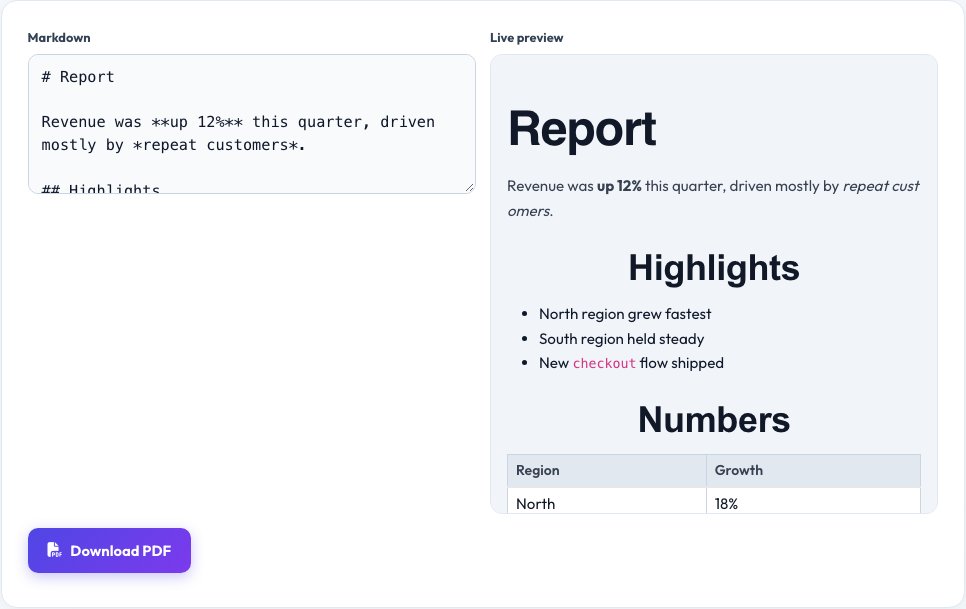
Free Markdown to PDF Converter — Real Text, Not a Screenshot
Paste or write Markdown — the plain-text format behind READMEs, technical docs and note-taking apps — and this tool parses it and lays it out as an actual multi-page PDF document with real, selectable, searchable text, not a picture of your page. Headings get real size and weight differences, bullet and numbered lists get real indentation and markers, **bold** and *italic* render properly, ```code blocks``` use a monospace font in a shaded box, and tables are drawn with real ruled lines and column widths.
This matters because many "markdown to PDF" tools online actually just screenshot a rendered HTML page into an image — the resulting PDF looks fine but the text can't be selected, searched, copied or read by a screen reader. This tool builds the PDF from real text objects instead, page by page, so the output behaves like any normal document.
Key features
Real text, not an image
Every word in the PDF is selectable, searchable and copyable — it wasn't screenshotted.
Full common Markdown support
Headings, bold, italic, lists, code blocks, blockquotes, links and tables.
Automatic pagination
Long documents flow correctly across multiple pages with proper margins.
One click download
No account, no watermark, straight to a .pdf file.
How to use it
- Paste or write your Markdown in the box.
- Check the live preview to confirm formatting looks right.
- Click Download PDF.
- Open the file — the text is real and selectable, not a picture.
Worked example
Example
Markdown: # Report\n\nRevenue was **up 12%** this quarter.\n\n- North region\n- South region\n\n-> produces a PDF with a large bold heading, a paragraph with real bold text, and an indented bullet list — all selectable.
Who uses this tool
Developers turning a README into a shareable doc
Send a real, readable PDF to non-technical teammates or clients.
Writers and students
Export notes or drafts written in Markdown to a document they can print or submit.
Anyone documenting in Markdown
Produce a proper PDF without installing Pandoc or a desktop app.
Tips for the best results
- Use `#`, `##`, `###` for headings — the PDF gives each level a distinct size automatically.
- Keep code blocks reasonably narrow; very long unbroken lines may run off the page edge like in most PDF renderers.
- Tables need a header row and a `---` separator row, standard Markdown table syntax, to render as a real table.
- Preview before downloading — what you see in the preview pane is what the PDF will contain.
Common mistakes to avoid
- Expecting embedded images to render — this converter focuses on real text formatting (headings, lists, tables, code) and does not fetch or embed remote images.
- Writing extremely long unbroken lines inside code blocks, which can run past the page margin.
- Forgetting the blank line Markdown requires between a paragraph and a following list for it to be recognized as a list.
Why use AZRS QuickFix?
It is 100% free, needs no signup and has no watermark or usage limits. The tool runs in your browser, so what you type stays on your device, and it works on phones, tablets and desktops. New tools are added every week — bookmark this page or browse the full QuickFix toolbox.
Frequently asked questions
Does the PDF contain real, selectable text?
Yes. Unlike screenshot-based converters, this tool builds the PDF from real text objects, so you can select, search and copy the text, and screen readers can read it.
Which Markdown features are supported?
Headings (# through ######), bold, italic, bullet and numbered lists, code blocks, blockquotes, links and tables — the common subset used in READMEs and notes.
Are images embedded?
Not currently — this version focuses on getting text formatting right as real, accessible PDF text rather than embedding remote images.
Is there a page limit?
No fixed limit; the tool paginates automatically as your content grows.
Is my document uploaded anywhere?
No, the PDF is built entirely in your browser.
Is this free?
Yes, with no signup, watermark or file-size catch.