Password-Protected ZIP Creator & Extractor
Create a real password-protected, AES-encrypted ZIP archive, or open one you have the password for — entirely in your browser · free, no signup
See Password-Protected ZIP Creator & Extractor in action
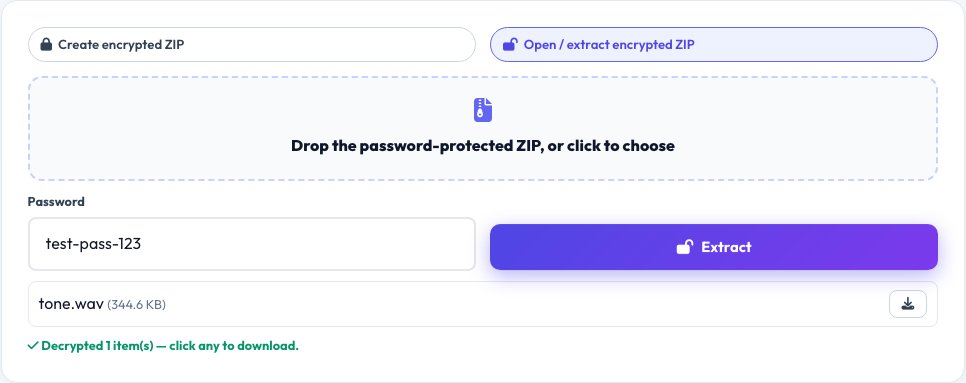
Password-Protected ZIP Creator & Extractor
This site's existing ZIP Creator & Extractor is explicit that password-protected archives aren't supported — this tool fills that real gap using zip.js, a library that implements genuine AES encryption inside the standard ZIP format. Drop in files, set a password, and it produces a real .zip file that any standard archive tool (Windows, macOS, 7-Zip, WinRAR) will prompt for that exact password to open, because the encryption is written into the file using the real, standard ZIP encryption specification, not a custom wrapper.
The same tool also opens and extracts a password-protected ZIP you already have — enter the password, and every file inside decrypts and downloads, all processed locally so neither your files nor your password are ever sent anywhere.
Key features
Real AES encryption in a standard ZIP
Uses zip.js to write genuine AES-encrypted entries in the standard ZIP format any archive tool can open with the password.
Create or extract
One tool both builds a new encrypted archive and opens/extracts an existing password-protected one.
Cross-compatible output
The resulting .zip opens correctly in Windows, macOS Archive Utility, 7-Zip and WinRAR, each prompting for the real password.
Fills a real gap in this site's existing ZIP tool
The plain ZIP Creator & Extractor explicitly doesn't support passwords — this tool exists specifically for that need.
How to use it
- To create: drop in your files, set a password, and download the encrypted ZIP.
- To extract: drop in a password-protected ZIP and enter its password.
- Every file inside decrypts and is offered for download.
- Share the archive and its password separately for real security.
Worked example
Example
Five confidential documents dropped in with the password 'harvest-92-moth' produce a single encrypted archive.zip that, when opened in any standard archive tool anywhere, prompts for a password before showing any file names or contents — without the correct password, nothing inside is readable.
Who uses this tool
Anyone emailing sensitive files
Send a real password-protected archive instead of an unprotected attachment, sharing the password through a separate channel.
Small businesses sharing confidential documents with clients
Add a real layer of protection beyond plain file attachments, using a standard format the client can open with any archive tool.
Anyone who received an encrypted ZIP and has its password
Extract it without installing separate archive software.
Tips for the best results
- Always send the password through a different channel than the archive itself (a separate email, a text message, a phone call) — sending both together defeats the purpose of encrypting it.
- Choose a real, non-guessable password — the encryption is only as strong as the password protecting it.
- The resulting file is a standard ZIP with AES encryption, so it opens the same way in any modern archive tool without needing this specific site.
Common mistakes to avoid
- Emailing the password in the same message as the encrypted file, which gives anyone who intercepts the email both the lock and the key.
- Using a weak, guessable password on a genuinely AES-encrypted archive, which undermines otherwise-strong real encryption.
- Assuming this site's other, existing ZIP tool supports passwords — it explicitly doesn't, which is exactly why this separate tool exists.
Why use AZRS QuickFix?
It is 100% free, needs no signup and has no watermark or usage limits. The tool runs in your browser, so what you type stays on your device, and it works on phones, tablets and desktops. New tools are added every week — bookmark this page or browse the full QuickFix toolbox.
Frequently asked questions
Is this real encryption, or just a password prompt?
Real encryption — zip.js implements genuine AES encryption as defined in the ZIP format specification, so the file contents are actually unreadable without the correct password, not merely hidden behind a UI prompt.
Will the encrypted ZIP open in normal archive software?
Yes — because it's written in the standard ZIP format with standard AES encryption, Windows, macOS Archive Utility, 7-Zip, WinRAR and other standard tools will open it and correctly prompt for the password.
Why doesn't the site's other ZIP tool do this?
That tool's own description states password-protected archives aren't supported; this is a separate, purpose-built tool specifically to fill that gap using a library capable of real ZIP encryption.
What if I forget the password?
There is no recovery — real encryption means the files are genuinely unreadable without the exact password, by design; store the password somewhere safe.
Is my file or password ever uploaded?
No — both creating and extracting happen entirely in your browser using zip.js; nothing is sent to any server.
Is my data stored?
No, nothing is saved after you leave the page.