Installed Font Checker
Find out which fonts are installed on your device and preview them · free, no signup
fonts.googleapis.com/css2) — only the one font you select is fetched, live, when you click it. Nothing is stored on this site. The list below is a curated set of 250+ popular family names; the full Google Fonts catalog has 1000+ and can be browsed directly at fonts.google.com.See Installed Font Checker in action
Installed Font Checker — See Which Fonts Your Device Has
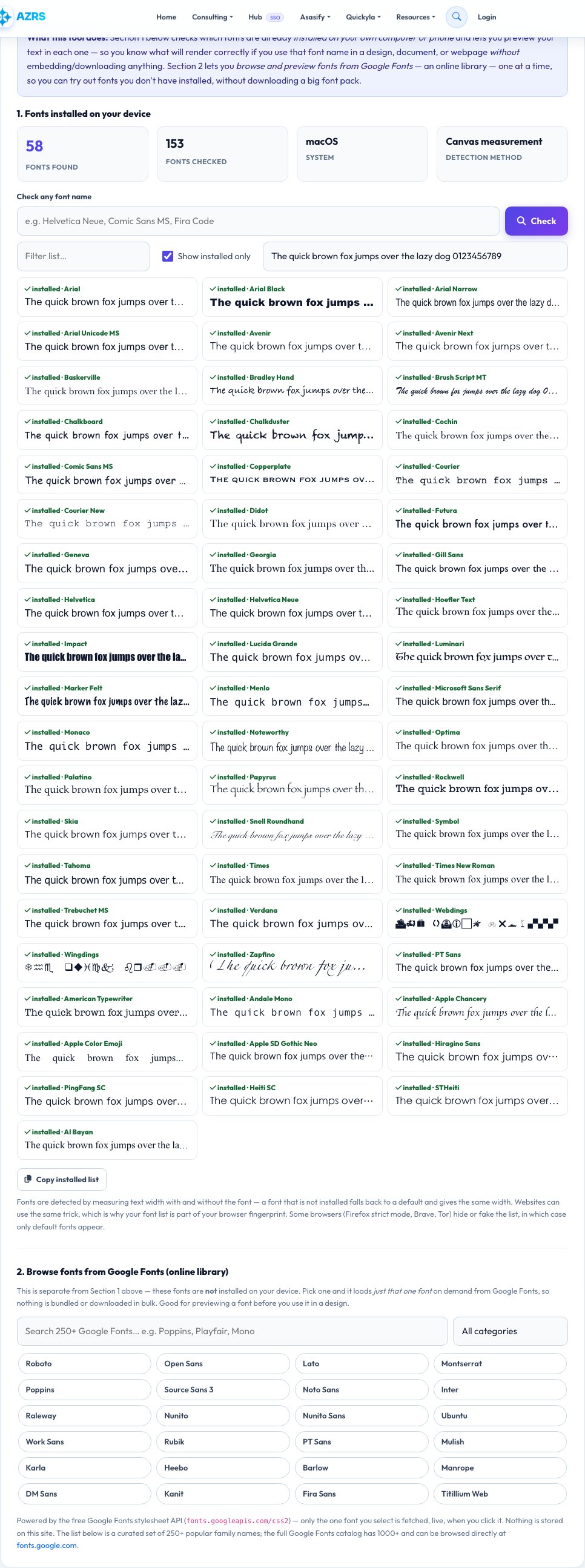
Designers, developers and anyone editing documents need to know whether a font is really installed. This checker tests more than 150 popular system and web fonts — Arial, Helvetica, Segoe UI, Calibri, Roboto, Fira Code, Noto and many more — and shows which ones your device has, with your sample text rendered in each installed font.
Type any font name to check it individually, filter the list, change the preview text and copy the list of installed fonts. Fonts are detected by measuring text width with and without the font, the same technique websites use — which is why your font list is part of your browser fingerprint. Everything runs locally and nothing is uploaded.
Key features
150+ fonts checked
System, Office, developer and web fonts.
Live preview
Your own sample text in every installed font.
Check any name
Test a specific font instantly.
Copy the list
Export installed fonts as plain text.
How to use it
- Open the page — installed fonts are detected automatically.
- Type your own preview text if you want.
- Use the box to check a specific font name.
- Copy the list of installed fonts.
Worked example
Example
Found 58 of 153 fonts · Helvetica Neue ✓ · Segoe UI ✗ (a Mac has no Segoe UI).
Who uses this tool
Designers and developers
Choose fonts that will render on users' devices.
Office and print users
Check a font before opening or sharing a document.
Privacy-minded users
See how identifying your font list is.
Tips for the best results
- Use web-safe fallbacks (font stacks) in CSS because visitors have different fonts.
- Install a font, then reload the page to detect it.
- Type the exact family name as shown in your font manager.
- Do not rely on rare fonts for essential designs.
Common mistakes to avoid
- Assuming a font is installed because it appears in a design tool.
- Misspelling the font family name.
- Using a font that exists on Windows but not on Mac or phones.
Why use AZRS QuickFix?
It is 100% free, needs no signup and has no watermark or usage limits. The tool runs in your browser, so what you type stays on your device, and it works on phones, tablets and desktops. New tools are added every week — bookmark this page or browse the full QuickFix toolbox.
Frequently asked questions
How does the font checker work?
It draws text in your font and in a fallback font and compares widths — a different width means the font is installed.
Why is a font I installed not detected?
Reload the page, and check that the name matches the family name exactly.
Can websites see my fonts?
Yes, using the same technique, which is why fonts are part of your fingerprint.
Why do I see few fonts in Firefox or Brave?
They limit or randomise font detection to protect privacy.
Does it list every font?
It checks a curated list of 150+ common fonts plus any name you type.
Is my font list uploaded?
No, it stays in your browser.